> ## Documentation Index
> Fetch the complete documentation index at: https://docs.katakate.org/llms.txt
> Use this file to discover all available pages before exploring further.
# Quickstart
> Install k7, prepare your node, start the API, and run your first sandbox
Katakate (k7) lets you run secure VM sandboxes on Kubernetes — Firecracker, QEMU + Longhorn, or [k7d](/k7d/index). This Quickstart gets you from zero to a working sandbox via CLI and Python SDK.
If you already installed k7 previously, consider running `make uninstall` before reinstalling to avoid stale cached files in a previous `.deb`.
## Requirements
* Linux (amd64) host with hardware virtualization (KVM)
* Check: `ls /dev/kvm` should exist
* Cloud guidance: AWS `.metal`, GCP (enable nested virtualization), Azure D/Ev series; typical VPS often lack KVM
* One raw, unformatted disk for thin‑pool provisioning (recommended for many sandboxes)
* Docker with Compose plugin (for the API)
* Install Docker: `curl -fsSL https://get.docker.com | sh`
* Ansible for the installer (Ubuntu):
```bash theme={null}
sudo add-apt-repository universe -y
sudo apt update
sudo apt install -y ansible
```
* Python 3.10+ on the client for the SDK
Tested setup example: Hetzner Robot instance, Ubuntu 24.04 (x86\_64), with an extra empty NVMe disk (for the thin‑pool). See the detailed setup guide (PDF): k7\_hetzner\_node\_setup.pdf.
## Install the CLI (APT)
Install the `k7` CLI on the node(s) that will host the VM sandboxes:
```bash theme={null}
sudo add-apt-repository ppa:katakate.org/k7
sudo apt update
sudo apt install k7
```
## Install K7 on your node(s)
This installs and wires up Kubernetes (K3s), Kata, Firecracker, Jailer, and the devmapper snapshotter with thin‑pool provisioning:
```bash theme={null}
k7 install
```
 You should see "Installation completed successfully!" when done. Add `-v` for verbose output.
## The API and managing keys
`k7 install` deploys the K7 API automatically as a `k7-api` Deployment in
`kube-system`. K3s keeps it running and reschedules it on failure — there's
no separate "start" step. If you want a CLI-only install with no API
deployed, pass `--no-api` to `k7 install`.
### Check API status
```bash theme={null}
k7 api status
```
### Get the endpoint
```bash theme={null}
k7 api endpoint
```
### Generate an API key
```bash theme={null}
k7 generate-api-key mykey
```
You should see "Installation completed successfully!" when done. Add `-v` for verbose output.
## The API and managing keys
`k7 install` deploys the K7 API automatically as a `k7-api` Deployment in
`kube-system`. K3s keeps it running and reschedules it on failure — there's
no separate "start" step. If you want a CLI-only install with no API
deployed, pass `--no-api` to `k7 install`.
### Check API status
```bash theme={null}
k7 api status
```
### Get the endpoint
```bash theme={null}
k7 api endpoint
```
### Generate an API key
```bash theme={null}
k7 generate-api-key mykey
```
 ### Temporarily disable / re-enable the API
```bash theme={null}
k7 api disable # scale k7-api to 0 (temporary off)
k7 api enable # scale back to 1
```
* API keys are stored at `/etc/k7/api_keys.json` on the cluster node.
Authentication accepts the `X-API-Key` header or `Authorization: Bearer `.
* The previous top-level commands `k7 start-api` / `k7 stop-api` /
`k7 api-status` / `k7 get-api-endpoint` are deprecated; they still work
for one release and emit a deprecation warning pointing at the new home.
## Create your first sandbox via CLI
Example `k7.yaml`:
```yaml theme={null}
name: demo
image: alpine:3.20
namespace: default
env_file: /root/secrets.env
limits:
cpu: "100m"
memory: "128Mi"
before_script: |
# Installing curl. Egress open during before_script, then restricted (empty whitelist) afterwards
apk add curl
echo $ENV_VAR_1
egress_whitelist: []
```
### Create a sandbox
```bash theme={null}
# Uses k7.yaml in the current directory by default
k7 create
```
### Temporarily disable / re-enable the API
```bash theme={null}
k7 api disable # scale k7-api to 0 (temporary off)
k7 api enable # scale back to 1
```
* API keys are stored at `/etc/k7/api_keys.json` on the cluster node.
Authentication accepts the `X-API-Key` header or `Authorization: Bearer `.
* The previous top-level commands `k7 start-api` / `k7 stop-api` /
`k7 api-status` / `k7 get-api-endpoint` are deprecated; they still work
for one release and emit a deprecation warning pointing at the new home.
## Create your first sandbox via CLI
Example `k7.yaml`:
```yaml theme={null}
name: demo
image: alpine:3.20
namespace: default
env_file: /root/secrets.env
limits:
cpu: "100m"
memory: "128Mi"
before_script: |
# Installing curl. Egress open during before_script, then restricted (empty whitelist) afterwards
apk add curl
echo $ENV_VAR_1
egress_whitelist: []
```
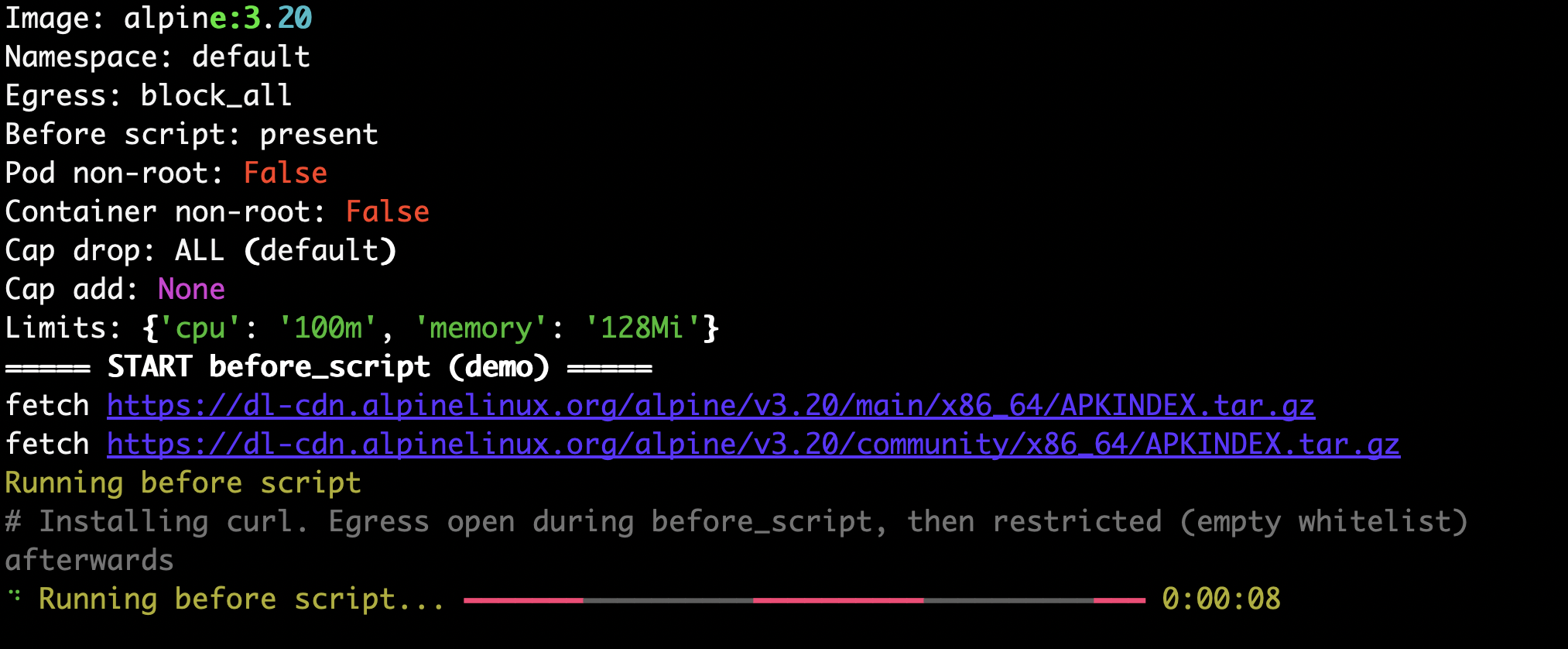
### Create a sandbox
```bash theme={null}
# Uses k7.yaml in the current directory by default
k7 create
```
 ### Shell into your sandbox
```bash theme={null}
k7 shell demo
```
### Shell into your sandbox
```bash theme={null}
k7 shell demo
```
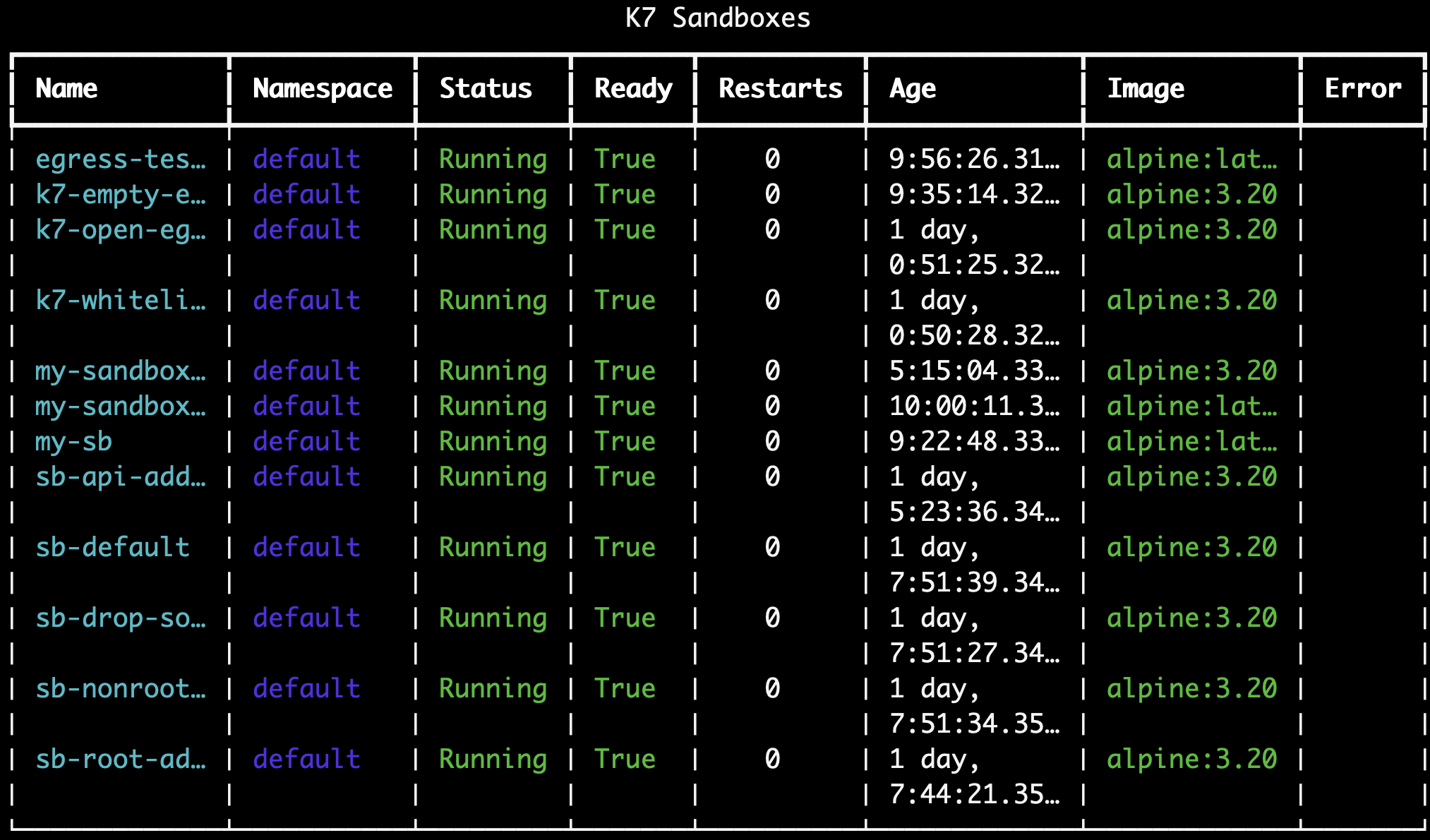
 ### List sandboxes
```bash theme={null}
k7 list
```
### List sandboxes
```bash theme={null}
k7 list
```
 ### Delete a sandbox
```bash theme={null}
k7 delete my-sandbox-123
```
### Delete all sandboxes
```bash theme={null}
k7 delete-all
```
### Prerequisites for the SDK
```bash theme={null}
# `k7 install` already deployed the API; just grab the endpoint and a key
k7 api endpoint
k7 generate-api-key my-key
```
## Create your first sandbox via Python SDK
Install the SDK on your client machine:
```bash theme={null}
pip install k7-sdk
```
Use the synchronous client:
```python theme={null}
from k7_sdk import Client
k7 = Client(endpoint="https://", api_key="")
# Create sandbox
sb = k7.create({
"name": "my-sandbox",
"image": "alpine:latest"
})
# Execute code
result = sb.exec('echo "Hello World"')
print(result["stdout"]) # or just print(sb.exec("echo hi"))
# List and cleanup
print(k7.list())
sb.delete()
```
Async variant:
```python theme={null}
import asyncio
from k7_sdk import AsyncClient
async def main():
k7 = AsyncClient(endpoint="https://", api_key="")
print(await k7.list())
await k7.aclose()
asyncio.run(main())
```
## Next steps
* Explore the CLI guide: `/guides/cli`
* Explore the Python SDK guide: `/guides/python-sdk`
* Integrate with the REST API: `/api/introduction`
### Delete a sandbox
```bash theme={null}
k7 delete my-sandbox-123
```
### Delete all sandboxes
```bash theme={null}
k7 delete-all
```
### Prerequisites for the SDK
```bash theme={null}
# `k7 install` already deployed the API; just grab the endpoint and a key
k7 api endpoint
k7 generate-api-key my-key
```
## Create your first sandbox via Python SDK
Install the SDK on your client machine:
```bash theme={null}
pip install k7-sdk
```
Use the synchronous client:
```python theme={null}
from k7_sdk import Client
k7 = Client(endpoint="https://", api_key="")
# Create sandbox
sb = k7.create({
"name": "my-sandbox",
"image": "alpine:latest"
})
# Execute code
result = sb.exec('echo "Hello World"')
print(result["stdout"]) # or just print(sb.exec("echo hi"))
# List and cleanup
print(k7.list())
sb.delete()
```
Async variant:
```python theme={null}
import asyncio
from k7_sdk import AsyncClient
async def main():
k7 = AsyncClient(endpoint="https://", api_key="")
print(await k7.list())
await k7.aclose()
asyncio.run(main())
```
## Next steps
* Explore the CLI guide: `/guides/cli`
* Explore the Python SDK guide: `/guides/python-sdk`
* Integrate with the REST API: `/api/introduction`